Wednesday, May 22, 2013

Backup Blogger and More Google Services data using Google Takeout


Google Takeout Services
Google Takeout is a free service offered by Google, created by a team of engineers known worldwide as Data Liberation Front. The service which is just like any other Google service provides an easy way for you to download and backup your data from services associated with Google. It is reliable and the best part is it allows you to log in with your Gmail username and password, no signing up to a new offering!
Google Takeout is now allowing you to download and back up even your Blogger and Google+data. Here is how you may do it.

Backup Google+ data using Google Takeout

I used the service for a brief period and found it to be really simple and straightforward. Initially, I logged in using my gmail account details and the service prompted me to either recover essential/desired data from all or choose individual services.
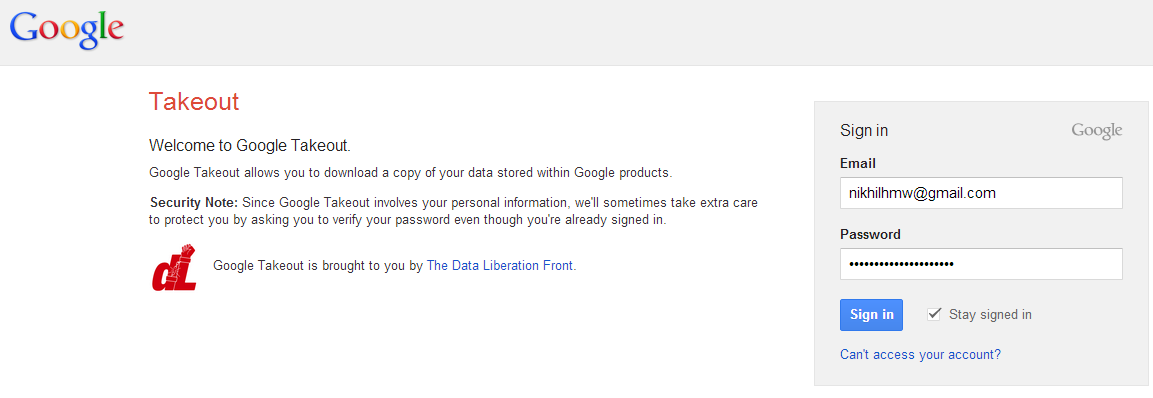
Google Takeout Login

Choosing a service

For testing purposes, I chose ‘Blogger’.

Google Takeout Archieve
Later, I saw a link – Create Archive, highlighted in red. Upon clicking this link, I was taken to a new page which displayed the package under the Downloads tab. If you’ve created a previous download, it’ll show that one on the bottom. To my surprise, I noticed the downloads were pretty quick – less than a few minutes for any download.
Google Takeout Archieve Download

Simply click on download and google will ask again for your google account password for security reason, Enter your password and your file will be downloaded in your download folder.
Visit Google Takeout and Backup your data.


Posted by R2blog. R2blog auto post for blogspot. Download at http://R2blogger.blogspot.com


How to set your own custom background on Facebook login page.


Well facebook is the leading social networking site currently, hopefully it is going to be taken over by www.digischoollife.com a new social networking site which was launched By teens For teens.
Well in this post, I'll show you how to change facebook login background with any picture of your choice. You dont need to be an expert programmer or coder, or lets say you dont need to be a programmer or coder at all. Because the work of the coders is already done by this extension called "fb refresh" from google Chrome.

Process:

  • Go to This link
  • Click on the ADD TO CHROME button.
  • When the extenstion is added, just single click on it and you are good to go.

Features:
  • Two DARK and LIGHT themes already included.
  • Upload ANY picture as fb login background.
  • Size and texture control

So just enjoy Fb YOUR STYLE :)

Posted by R2blog. R2blog auto post for blogspot. Download at http://R2blogger.blogspot.com


Hack Anyone's Facebook Status


Facebook Hacking- Half of blog over internet is sharing about how to hack facebook? All the articles are full of 'mind gossip' and lastly you didn't get any results. The new one is "How To Hack Anyone's Facebook Status" . The most easiest hack/trick overall. Just like playing card games over computer.
Here is the step-by-step tutorial on how to hack facebook status of anyone. Follow the instructions below.


Step 1 : Send this link to person you want to target : (https://m.facebook.com/upload.php?email&_rdr)


Step 2 : Ask the victim to give above marked E-mail id of his/her facebook.

Step 3 : You must have an Gmail-id to post on his/her timeline. If you donot have create one by clicking here

Step 4 : Then, Sign In to Gmail, And compose a mail.

Step 5 : Write the Email address of victim that you have got above,
And in the Subject section write what ever you want to update in victims timeline and send the mail.

"All over Status will be updated on his/her Facebook Timeline" Enjoy Hacking :)

Posted by R2blog. R2blog auto post for blogspot. Download at http://R2blogger.blogspot.com


SquishyCash. earn 1$ just for Referring Friends. Voted Best referring CPM by Google 2012. With Proof.


Hi friends. As you all know i've already posted many posts regarding earning for teens and students. But well there's always a BETTER. and here i'm not talking about the better but the BEST. Squishycash Is the BEST reffering CPM as rated by google itself in 2012. Squishycash offers you 1$ that is 49.95Rupeees for referring just one friend and that is the maximum any CPM can ever offer you. Also there are many other features for extra earnings. Sign up and get $5 Instantly.

Click here and join Squishycash. Limited time $5 signup promotional offer


Proof:

Features:

  • Refer friends 1$/refferal
  • Fill our forms 0.50-1$ per form.
  • Post Forums. 0.2$ for every forum and 2$ for every Accepted Forum.
Now with all these features here'z the bonus feature:
You get 5$ just for signing up. SO what are you waiting for? This is persoanly verified by me and so i'm posting it here. Go on gyes Get what you can.


Posted by R2blog. R2blog auto post for blogspot. Download at http://R2blogger.blogspot.com


DigiSchoolLife- A new step towards Social Networking Final V. Launched.


Hi friends. As most of yoy might know i posted the launch of Digi School Life.com a new social networking site for teens, but the site was down due to some server upgradation shedules.
Anyway now DSl is Live again with a totally surprising new look and a handful of new features, and also a number of Exclusive DSL only Features.


Exclusive Features:

  • Handwriting Chat. Chat with your online friends in your own handwriting.
  • Share Music directly from your desktop on your dashboard. As easy as uploading a picture.
  • Over 50Games, and the best part is that they load in less than 10seconds.
  • Screen Sharing- Share your screen with anyone online for solutions to your problem or just for friend.
  • Customize your profile / dashboard exactly as you want and place the different tabs to the location you want them.
  • 6 Pre-installed themes to choose. "Facebookish", "Tweeties" and 4more. Change the theme to the one you like.
Common Features:
  • Status Updates.
  • Poll
  • Own a Blog under DSL and much more.
  • Send files unlimited size in the chatbox itself.

Screenshots: [ Must check out ]

Dashboard:


Share Music


Different themes to choose:


Posted by R2blog. R2blog auto post for blogspot. Download at http://R2blogger.blogspot.com


Microsoft releases Microsoft Safety Scanner, a free on-demand antivirus tool


Microsoft has just released an on-demand anti-malware scanner called as The Microsoft Safety Scanner. MSS is a free downloadable security tool for the Windows user and provides on-demand scanning and helps remove viruses, spyware, and other malicious software.
The Microsoft Safety Scanner, expires 10 days after being downloaded. To rerun a scan with the latest anti-malware definitions, download and run the Microsoft Safety Scanner again. Do note that its not exactly a small file … its msert.exe file is a 68 MB download!
The MSS is different from the Malicious Software Removal Tool – nor is it meant to be a replacement for using an antivirus software program that provides ongoing protection. It is meant to be used as an additional on-demand scanner in addition to your existing antivirus software, should you feel the need for a second opinion. It works along with your existing antivirus software
If MSS detects Malware or if an error occurs when MSS is running, a report is sent to Microsoft that contains basic information about the Malware or about the error. The reports sent to Microsoft include technical information about MSS, Malware found, and your computer, such as, MSS version number, file names, cryptographic hash, size, date stamp, and other characteristics of any Malware removed from the computer, the success or failure of Malware removal, the computer’s manufacturer, model and processor architecture, etc.
If you do not want MSS to send any information to Microsoft, you can disable the MSS’s reporting component with the following registry key setting.
Subkey: HKEY_LOCAL_MACHINE\SOFTWARE\Policies\Microsoft\MSERT
Entry name: \DontReportInfectionInformation
Type: REG_DWORD
Value data: 1
Microsoft appears to have discontinued the Windows Live OneCare Safety Scanner which also performed additional tasks like PC clean-up, Tuneup, etc, and replaced it with this new Microsoft Safety Scanner.

Click Here To Download : Microsoft Safety Scanner

Posted by R2blog. R2blog auto post for blogspot. Download at http://R2blogger.blogspot.com


EagleGet: Free Universal Download Manager and Accelerator for Windows


A download accelerator is a program that helps a computer or a PC download content more quickly over Internet. In a way, it is a software that optimizes the download process. There are many popular free download managers available like Internet Download Manager,

Download Express, Free Download, Manager over the Internet for download. The latest to enter this camp is EagleGet.
EagleGet Review:


EagleGet is a freeware that uses multi-threaded technology to accelerate downloads by splitting files into several parts and then transferring them simultaneously, thus increase download speed scientifically. The program is compatible with many browsers such as Internet Explorer, Chrome, Opera and Firefox.


On launching the program, you will be welcomed with a clean interface. The navigation panel towards the left lets you manage the files needed to download.

In case you require additional options to manage your files/resources, you can access them through the right-click context menu. For downloading online videos you just need to move the mouse cursor over the video player and click ‘Download’. That’s it! The video you want to download automatically gets downloaded to the hard disk of your computer.
Most video downloading programs only support few video sites. Moreover, users have to copy the URL address to the software in order to get the video. EagleGet bypasses all these steps. The program not only downloads programs from popular online video websites but also support HTTP, HTTPS, FTP, MMS and RTSP protocol.
If you would like to track the progress of the download, you can access the float window. For this, just double-click a file name and the program will happily display the task in the download queue.

Once, the download is complete, the program shows up a pop-up window and even plays a sound to notify the user that download is complete. You can then open the file and open it to play immediately.
To configure other settings and additional options you can access the ‘Configuration’ window. The button is present on top of the main window. It allows you to specify the download directory, choose resident behavior and do lot more.

EagleGet integrates well with most browsers and is free for personal use.


Posted by R2blog. R2blog auto post for blogspot. Download at http://R2blogger.blogspot.com